
Completely eliminate spam and bot headaches
24/7 automatic protection from spam, bots, brute force attacks and suspicious IPs.

Stop dangerous traffic before it can harm your site
Keep your sites spam-free, fast and secure without lifting a finger. Eliminate comment spam and automatically block brute-force attacks, vulnerability exploits, and unauthorized access with protection that works invisibly in the background 24/7.
Included for free with:
Every hosting plan
Flip the switch directly from the Hub if you’re hosting with us. No setup, no tech, no hassle.
Defender Pro plugin
Defender Pro gives you AntiBot on every site you connect, regardless of where they’re hosted.
Your One-Click Defense Against Security Threats
AntiBot protects your website and your users from a host of nasty threats, so you can focus on creating great content and growing your audience.
Always Has Your Back, Without Slowing You Down
Get 24/7 protection from suspicious activity, from a firewall that performs so efficiently you won’t even notice it’s there.
Keeps Everything Running Smoothly
By blocking bad bots, AntiBot avoids strain on your server. Enjoy faster loading time and a better experience for your visitors.
Safeguards Your Content
Rest easy knowing you’ll never have to worry about bots scraping your content or stealing your bandwidth.
Generates Up-To-Date Blocklists Daily
It’s like having a bouncer for your website. If an IP is on the blocklist (updated every 12 hours), they’re not getting in!
Interconnected Global Protection
If an IP is flagged for malicious activity, it’ll be automatically blocked from the very first visit - anywhere in our network.
Set-It-And-Forget-It Solution
Our system analyzes hundreds of thousands of suspicious IPs every day, with no need for manual configuration or monitoring from your end.
Basic & Strict Mode
Pick the level of security that suits your site. Use Basic Mode for balanced, everyday protection that plays nicely with trusted tools, or switch to Strict Mode for tougher filtering that blocks even the slightest suspicious activity.
Spam Protection
Keep spam comments and bots at bay before they reach your site. AntiBot learns from activity across thousands of sites, instantly blocking bad actors so you don't have to deal with spam headaches.
Central Security Management, Made Easy
Manage all AntiBot configurations, IP blocklists and allowlists across all sites, from one convenient location in the Hub.
Proactive Protection That Gives You Peace of Mind
Antibot Global Firewall defends you much more effectively than a local firewall.
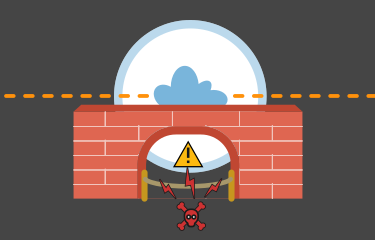
How a Local Firewall Works
A local firewall has limited protection, only following pre-set rules. It may block known threats but miss new ones or accidentally block legitimate traffic.
It’s like having one security guard who has only been instructed to watch out for suspicious individuals who match a specific description.
VS
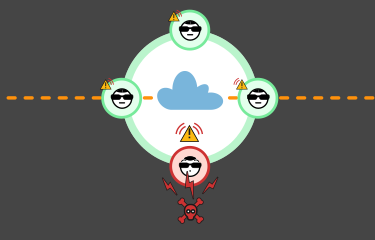
How AntiBot Global Firewall Works
AntiBot Global Firewall blocks any IP addresses flagged on our huge threat detection network.
When one site spots a threat, all other sites get protected too.
See AntiBot In Action
Get a real-time look at the bots, spam, and malicious IPs AntiBot is blocking across our network—updated live from over 750,000 sites.
View Daily Threat Data
AntiBot Global Firewall: Important FAQ
Antibot Global Firewall is free, even if you’re not hosted on WPMU DEV.
Install Defender plugin, sign up with WPMU DEV and connect your site. If your site is hosted on WPMU DEV, activate directly from The Hub or the Defender plugin.
AntiBot prevents DDoS attacks, brute-force logins, and comment spam using both server-level (WPMU DEV hosting) and plugin-level (Defender plugin) protection. Both offer protection, but server-level blocking is more effective at conserving server resources.
Yes! If your site is hosted on WPMU DEV you can add IPs directly to the Central IP Allowlist on the HUB. If you’re hosted on a third-party server, you can add IPs to either the plugin’s local Allowlist or the Central IP Allowlist on The Hub.