NEW: Turn Client Emails Into Organized Hub Tickets 🎉
WPMU DEV Products

Client support starts innocently enough.
One client emails you directly. Another fills out your contact form. Someone sends a WhatsApp message. A teammate gets a “quick question” in their own inbox. And, somehow, a client has replied to a three-month-old email thread with something urgent buried under 14 quoted replies.
Soon your “simple” support process has become a bit of a scavenger hunt.
The problem isn’t that your clients need help. Of course they do. It’s that all these requests are scattered everywhere, and keeping track of who said what, who replied, and what still needs doing can turn into a full-time job.
So, good news: Tickets now integrates with your branded email address!
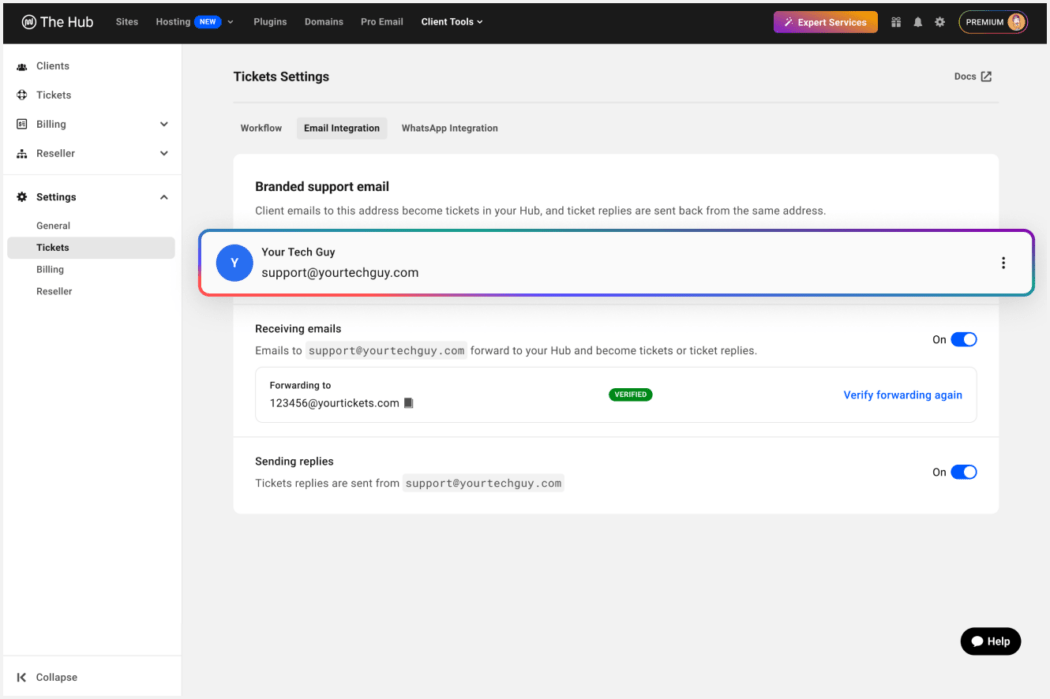
Now, Premium members can give clients a branded support email and have every request automatically become a Hub ticket. Your team can manage, assign, and reply to the request from The Hub and clients receive updates from your branded email address.
Your clients get the ease of email. Your team gets the structure of a proper helpdesk inside The Hub.
So… how does this email-to-ticket wizardry work? 🧙
Glad you asked.
1. Set up your branded support email
Create a dedicated support address like [email protected] or [email protected].
Instantly, your clients have one clear, professional place to send requests, questions, site updates, “can you just quickly…” jobs, and everything else that usually lands in five different places.
2. Clients send requests by email
They use the email app they already know. No extra password to forget. No mini onboarding session required.
3. The Hub creates the ticket automatically
The client’s email becomes a Hub ticket, ready for your team to assign, prioritize, and manage.
So instead of requests disappearing into inbox spaghetti, everything gets its own tidy little home.
4. Your team handles it from The Hub
Assign it to the right person, reply to the client, track progress, and keep the full conversation history attached to the ticket.
5. Clients receive branded updates by email
When your team replies from The Hub, clients receive the update from your super-profesh branded support address.
Look like you have an entire support department. Even if it’s just you and your cat.
Being able to give your clients a support email like [email protected] instead of telling them to log into a portal or submit a form instantly makes your client experience feel more polished.
It signals that your agency has a real support process, and makes your business come across as organized, reliable and scalable. For smaller agencies, it helps you deliver the kind of support experience clients expect from a much larger team.
Your clients don’t need to know what’s happening behind the scenes. They just see a clean, branded support channel and receive helpful updates from your agency, without bolting on a separate helpdesk platform or adding another subscription to the pile.
Behind the scenes, The Hub is doing the heavy lifting: creating the ticket, organizing the conversation, keeping the history, and helping your team stay on top of every request.
Built to be easy to hand off to your growing team
As your agency grows, support gets harder to manage. Hub Tickets helps your team stay aligned by giving everyone one place to manage client requests.
You can assign tickets to team members, track progress from a shared workspace, and keep conversations connected to the request instead of scattered across individual inboxes.
This makes it easier to hand off work between team members, keep client communication consistent, build repeatable support processes and onboard additional support staff as you grow.
Support should live alongside the rest of your client work
Email Tickets is powerful on its own, but the real value comes from the fact that your support now becomes connected to the rest of The Hub.
Now, your support workflow will live alongside the tools you already use to manage your clients and their websites. Instead of adding another standalone helpdesk, your support and the services you sell, the team members doing the work, and the invoices or recurring plans behind it all will be in one place.

Email support? Client portal? Use either, or both!
Email Tickets also works alongside the existing white-labeled client portal option in The Hub. That means you can choose the client support experience that works best for your agency.
- Branded Email Support: The best option for when you want the fastest, easiest way for your clients to ask for help. All they need to do is send an email, and The Hub will turn it into an organized ticket.
- The White-Label Client Portal: The ideal option for when you want clients to log in, submit requests, view their ticket history, and track progress on issues from a professional-looking, branded portal.

By the way, you don’t have to choose one and stick to it forever. You can use one, then switch to another, or even offer both depending on how your clients prefer to work.
Oh, and yes, it’s included with Premium!
No need to go shopping for another monthly helpdesk bill. Email Tickets are included with your membership!
Which means you can give clients a branded support email, turn requests into organized tickets, collaborate with your team, and keep support connected to your clients, sites, billing, hosting, backups, plugins, and all the other Hub goodies you already use.
Just one more way Premium helps you run a sharper, more efficient, more delightfully organized WordPress business from one place.
Ready to start using Email Tickets?
Give your clients an easier way to ask for help, and your team one organized place to manage every request.
Integrate your branded email with Tickets, so you can level up your client support.

All the good WordPress stuff, once a month
Subscribe
Create your free account to post your comment
Login to post your comment