
12. Understanding Your Email Solutions

Choosing the right email solution is crucial for your online presence.
In addition to the regular transactional email that comes with any WordPress site, WPMU DEV offers three distinct email services to meet your diverse needs. Below, you will find a guide to what each service entails and its benefits.
12.1 Transactional Email
Copy chapter anchor to clipboardTransactional Email refers to the emails that every WordPress site sends regarding its administration and maintenance. Examples include WordPress updates, new user registrations and user comments.
Transactional Email Policies
In order to protect our members’ domain reputations, and to keep emails from their WPMU DEV hosted sites from winding up in spam inboxes, the From address on these transactional emails is [email protected]. All WPMU DEV sites are preconfigured to handle transactional emails in this way, and no configuration is required.
We do not allow sending non-transactional emails from [email protected]. These types of emails should be sent from an email address you own.
Note that this applies to all WPMU DEV hosted sites, including those where you have created one or more POP3 email accounts using your own domain. If you wish to change the From address on noreply emails to an address you own, use SMTP with any email server, even from one of your own Pro Email accounts. Our Branda plugin has an easy SMTP tool built right in for that. Learn how to configure SMTP sending in Branda here.
Transactional Email Limits
The number of transactional emails that can be sent per day and month for each WPMU DEV hosted site is limited, as shown below. These limits only apply if you are using our default [email protected] address. They do not apply if you’re using SMTP or an email address you own through a third-party mail service.
These sending limits are continuously monitored and, if your site exceeds these limits, we will notify you and temporarily block email sending until the daily or monthly average falls below the limit allowed on your plan.
Hosting Plan
Quantum
Bronze (all plans)
Silver (all plans)
Gold (all plans)
Platinum (all plans)
Uranium (all plans)
Titanium
Palladium
30-Day Limit (last 30 days)
1,500
3,000
6,000
12,000
24,000
48,000
48,000
48,000
24-Hour Limit (last 24 hours)
75
150
300
600
1,200
2,400
2,400
2,400
Note that daily email limits are calculated based on the last 24-hour period, and the cumulative 30-day total cannot exceed the 30-day limit. For example, if you’re on the Bronze hosting plan, which has a limit of 150 emails, and you send 50 emails at 5am, another 50 at 10am, and another 50 at 3pm, you’ll have hit the 24-hour limit allowed by that plan. You’d have to wait until 5am the next day to be able to send another 50 emails, at which time you’d again hit the limit for the last 24 hours.
Still following along on our example of Bronze hosting, if you consistently send 150 emails for every 24-hour period, you’d hit the 30-day limit of 3000 within 20 days. You’d then need to wait a full 24 hours before being able to send a single email.
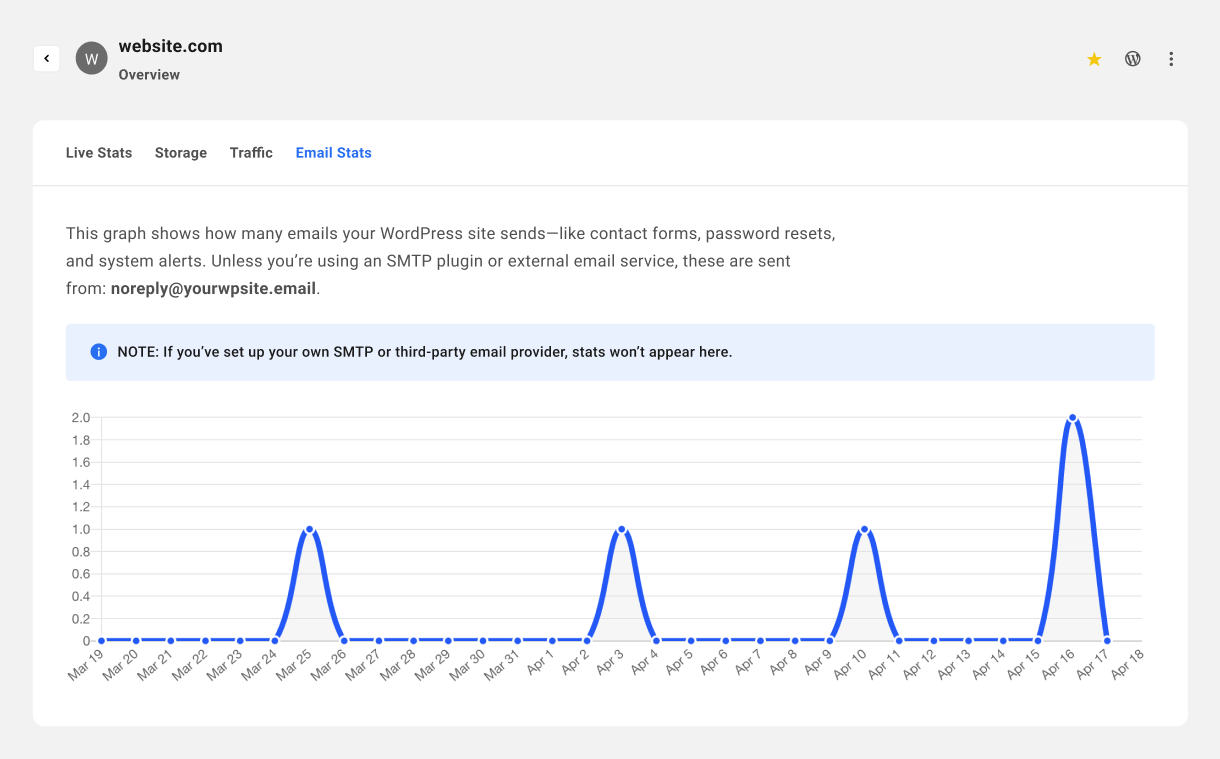
This explains why you might not be able to send emails, although the Email Stats under the Analytics tab of your site shows that you sent less than 150 emails (in our example, it is 50 emails) for that specific day.
If your site needs to regularly send more emails than our quota allows, please upgrade your plan or configure WordPress to use SMTP or another transactional email service like MailChannels.
You can view the number of emails your site has sent during the past 30 days under the Email Stats tab on your Hosting > Analytics screen.
12.2 Hosting Email (POP3)
Copy chapter anchor to clipboardYour Basic, Free Option
Overview: This service is integrated with every hosting account, utilizing the Post Office Protocol (POP3) to download emails to your device. It’s the simplest solution for basic email needs.
Ideal for: Individuals or businesses that require straightforward email functionalities directly tied to their hosting account.
Key Benefit: Free for up to 10 email accounts per hosting account, making it perfect for those managing emails primarily from a single location or device.
See our Basic Email documentation for details.
12.3 Email Forwarding
Copy chapter anchor to clipboardMaintain Professionalism Without Extra Costs
Overview: A service that forwards incoming emails from your domain to another email address you own, like your existing Gmail or Outlook.
Ideal for: Those who prefer using their current email provider but wish to enhance their professional presence with a domain-based email address.
Key Benefit: It’s a free service with your hosting account, enabling you to keep your professional domain presence in email communications without the complexity of managing a separate email service.
See our Email Forwarding documentation for details.
12.4 Pro Email (IMAP)
Copy chapter anchor to clipboardA Comprehensive Email Solution
Overview: Pro Email is a feature-rich email solution that supports Internet Message Access Protocol (IMAP) for device syncing and web access. This service is independent of our hosting solutions, offering greater flexibility.
Ideal for: Users who need a robust email service that is accessible from any web browser or device.
Key Benefit: This paid service offers the most flexibility and accessibility, ideal for those requiring email access from multiple locations or devices. It is independent from hosting constraints.
See our Pro Email documentation for details.
12.5 Email FAQs
Copy chapter anchor to clipboardWhat is Hosting Email (POP3), and is it free?
Hosting Email (POP3) is a basic, hosting-tied email service that lets you send and receive emails using POP3. It is free for up to 10 email accounts per hosting account.
How does Pro Email (IMAP) differ from Hosting Email?
Pro Email provides a comprehensive email solution with IMAP support for syncing across devices and web access. Unlike Hosting Email (POP3), which is tied to hosting, Pro Email can be used with any domain as a paid service.
Can I use both Hosting Email and Pro Email for the same domain?
No, due to different MX records required, Hosting Email and Pro Email cannot be used simultaneously for the same domain. Choose the service that best meets your needs.
12.6 Get Support
Copy chapter anchor to clipboardIf you still have questions or need assistance after reading this document, please don’t hesitate to contact our support superheroes using the available options under the Support tab in your Hub or via the Support tab in your WPMU DEV Dashboard.

